Cable Printing Wheel Management: Controlled Picking, Return Tracking and Automatic Put-Away
In a wire and cable factory, the most costly printing-wheel mistake may not be failing to find a wheel. It may be selecting one that looks right but carries the wrong marking. Wheels with similar bodies can correspond to different customers, cable products, marking content or revisions.
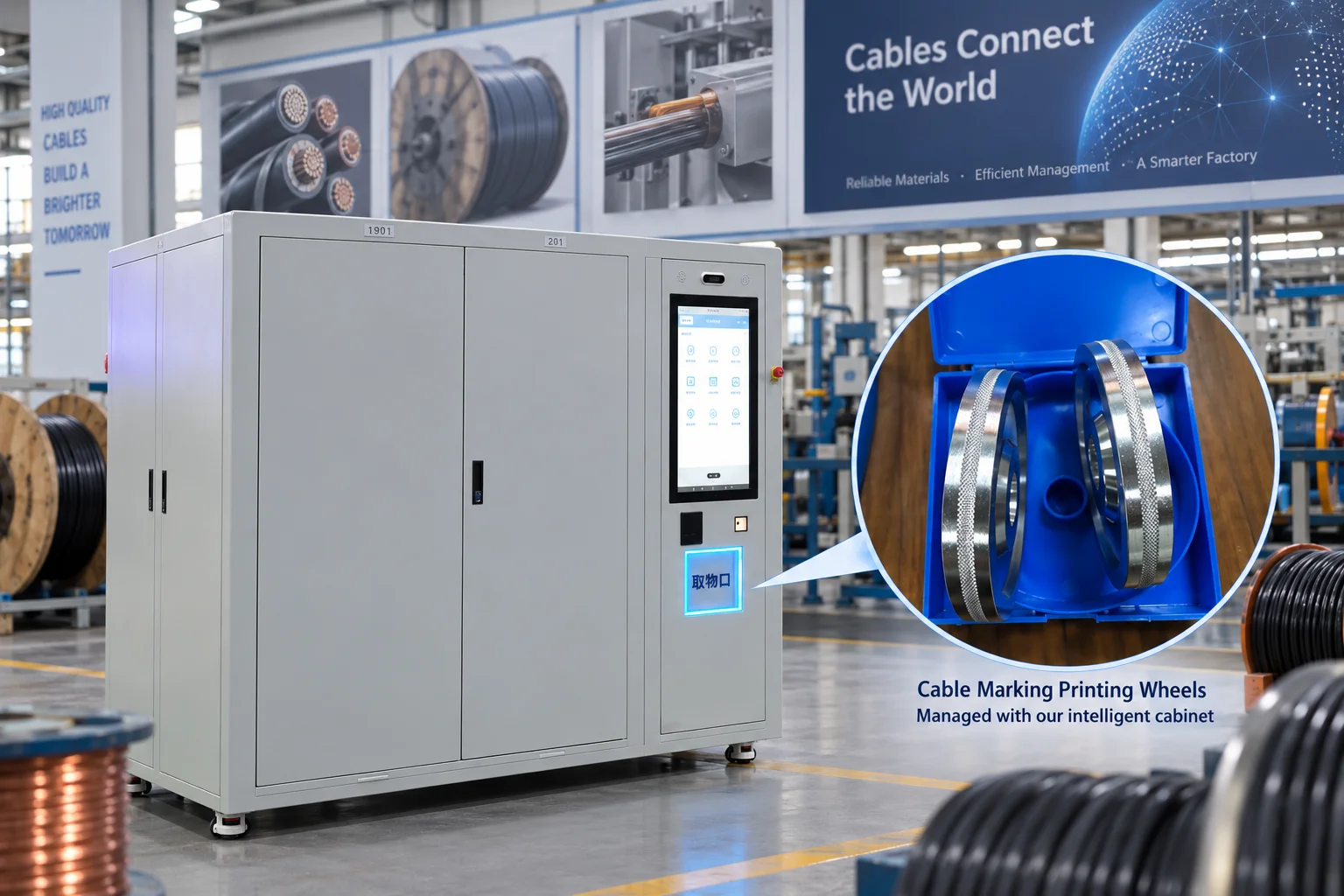
A wrong selection can lead to incorrect product identification, rework, scrap or delivery delays. The risk can also begin after production, when a used wheel is placed in an available gap rather than returned to its assigned location. The next operator then starts with an unreliable storage arrangement.
A printing wheel storage system should address both ends of this process: controlled picking and controlled return. Because printing wheels are reusable tooling rather than items consumed at every issue, their identity, borrower, condition and location should remain traceable throughout the checkout-and-return cycle.
Give every tracked wheel a unique identity
Create an individual ID for each wheel that needs to be tracked separately. Link that ID to a clear image of the actual marking, the applicable customer or product, revision, compatible equipment and assigned storage position. Highlight the distinguishing fields so operators do not have to guess between near-identical item names.
Separate the wheel model from the individual asset ID. The model defines what the wheel is suitable for; the asset ID identifies the specific physical wheel that was issued. This distinction is important when several spare wheels carry the same marking.
When a marking revision is withdrawn, update its issue status rather than relying on a handwritten note or someone remembering that the old wheel must not be used. An item's presence inside the cabinet should not automatically make it available for selection.
CAB-007: the machine puts returned wheels back in their assigned locations
The CAB-007 Automated Micro Warehouse Cabinet in Qtech's product range is intended for reusable industrial items suitable for automated handling, including printing wheels and similar production tooling. Its return workflow addresses a specific problem: employees should not need to remember where each look-alike wheel belongs.
In the configured workflow, an authorized employee selects the required wheel and collects it at the access window. After use, the employee hands the wheel back through the specified return interface. The internal automated handling mechanism then places it back into its assigned storage location.
This is automatic physical put-away, not simply an on-screen instruction telling the employee which compartment to use. The operator completes the handover, while the machine performs the internal storage movement. The return interface, carrier design and handling limits must be confirmed for the actual wheel samples.
For cable printing wheel management, the practical value is a more controlled exchange: select the registered wheel, collect it at the designated point, return it through the agreed process and let the mechanism restore its storage position. This reduces the number of manual searching and placement decisions that can introduce confusion.
Connect wheel selection to the production requirement
Plan to associate each checkout with the relevant order, product, machine or production team. When the application requires the system to restrict selection to the wheel approved for a particular order, define the work-order data source, item mapping and software integration scope before implementation.
User authentication and order-level error prevention are different capabilities. A login can identify the employee without establishing that the chosen marking is correct for the next production run. The project should specify how this connection is checked and which exceptions require approval.
Where individual identity verification is needed, evaluate a barcode, tag or another suitable identification method. Qtech's smart cabinet and RFID configuration options can support a discussion of the identification approach, but automated identification and automated handling are not the same function. Do not assume that every cabinet configuration includes both.
Manage condition as carefully as location
After use, clean and inspect the wheel according to the factory's procedure. Worn surfaces, damage, unclear marking or an unresolved revision question should lead to an inspection or hold status rather than immediate availability. Being returned to the correct location does not make an unsuitable wheel ready for production.
A useful printing wheel checkout and return system records who borrowed the wheel, when it left storage, when it came back and its current status. Agree on overdue-return rules and exception notifications as part of the software workflow. These records give supervisors a starting point for investigating missing tools, unclear handovers and unnecessary replacement purchases.
Test the difficult cases before going live
Use the two most similar-looking wheel types in your sample set to demonstrate selection, collection, return and retrieval again. Repeat the test with two individual wheels of the same model. Include withdrawn revisions, items awaiting inspection and an attempted incorrect return.
The demonstration should establish three things: the correct identity, the correct storage position and the correct availability status. A machine moving an object successfully proves only one part of the workflow. Also confirm how exceptions are detected, who can resolve them and what the operator sees when a return cannot be accepted.
Automatic put-away should not be described as automatic reading of the wheel's engraved content unless that capability has been specifically provided and validated. Correct master data, controlled stocking, an agreed identity check and the factory's first-off production approval remain part of error prevention.
Build a return process that does not depend on memory
Managing a large collection of similar cable marking wheels? Review Qtech automated storage and reusable-tool cabinet options and share wheel photographs, size and weight ranges, the number of models, peak simultaneous checkouts and your return requirements. Use real samples to confirm correct selection, verified handover and automatic return to the assigned location.
Use this page for CMS setup. The complete article begins on the following page. Do not publish the keyword planning or image notes as article text.
Search listing
Keyword plan
Image and publishing notes
Use photographs of the five material groups with appropriate cabinet examples. Do not imply that a feature shown in one cabinet is standard across all models.
Keywords are selected for relevance and buying intent, not measured search volume. Suggested slugs are new article identifiers, not existing live pages. Internal links are embedded in the article text.
Frequently Asked Questions
Can a smart cabinet manage printing wheels that are not consumables?
Yes. Use a reusable-tool workflow that tracks the borrower, checked-out status, return and location. A wheel leaving the cabinet is a checkout, not necessarily permanent consumption of stock.
Does automatic return mean the employee puts the wheel back manually?
Not in the CAB-007 workflow described here. The employee hands the item back to the cabinet, and the internal handling mechanism performs put-away into its assigned location. The exact handover steps depend on the agreed equipment configuration.
Will an automated cabinet eliminate every printing-wheel error?
No system should be presented as a guarantee of zero mistakes. Controlled selection and automatic put-away can reduce opportunities for confusion, but accurate data, identity checks, replenishment controls and production approval are still necessary.